Choose the source
Start from an approved template, write editable wording, convert a Word or PDF document, or upload a finished PDF that only needs signatures.
Set up the approved version once. For each agreement, fill what changed, invite every signer and send a clear next step. SignThat keeps everyone in the loop until the final record is ready.
SignThat brings the steps your team already knows—prepare, personalise, send, follow up and retain—into one calm workflow that is easy for everyone to follow.
Paste Markdown or styled HTML, add placeholders for details such as client name, fee and start date, then choose which values your team supplies and which fields belong to a recipient. Save defaults for details that rarely change.
Enter what is different this time, assign each field, choose delivery timing and give every recipient an individual secure signing link. Use a remote link for everyday handoffs or a short-lived QR session when someone is nearby.
The activity trail records delivery, opens, views, reminders and signatures. Your team can see where things stand, scheduled follow-ups keep the agreement moving, and the finished PDF and completion record stay together.
The builder keeps the decisions in a clear order: choose the document, add each recipient, complete the sender fields, then check the final document and delivery. The example below starts from the approved brand-project template and a saved Harbour & Pine customer profile.
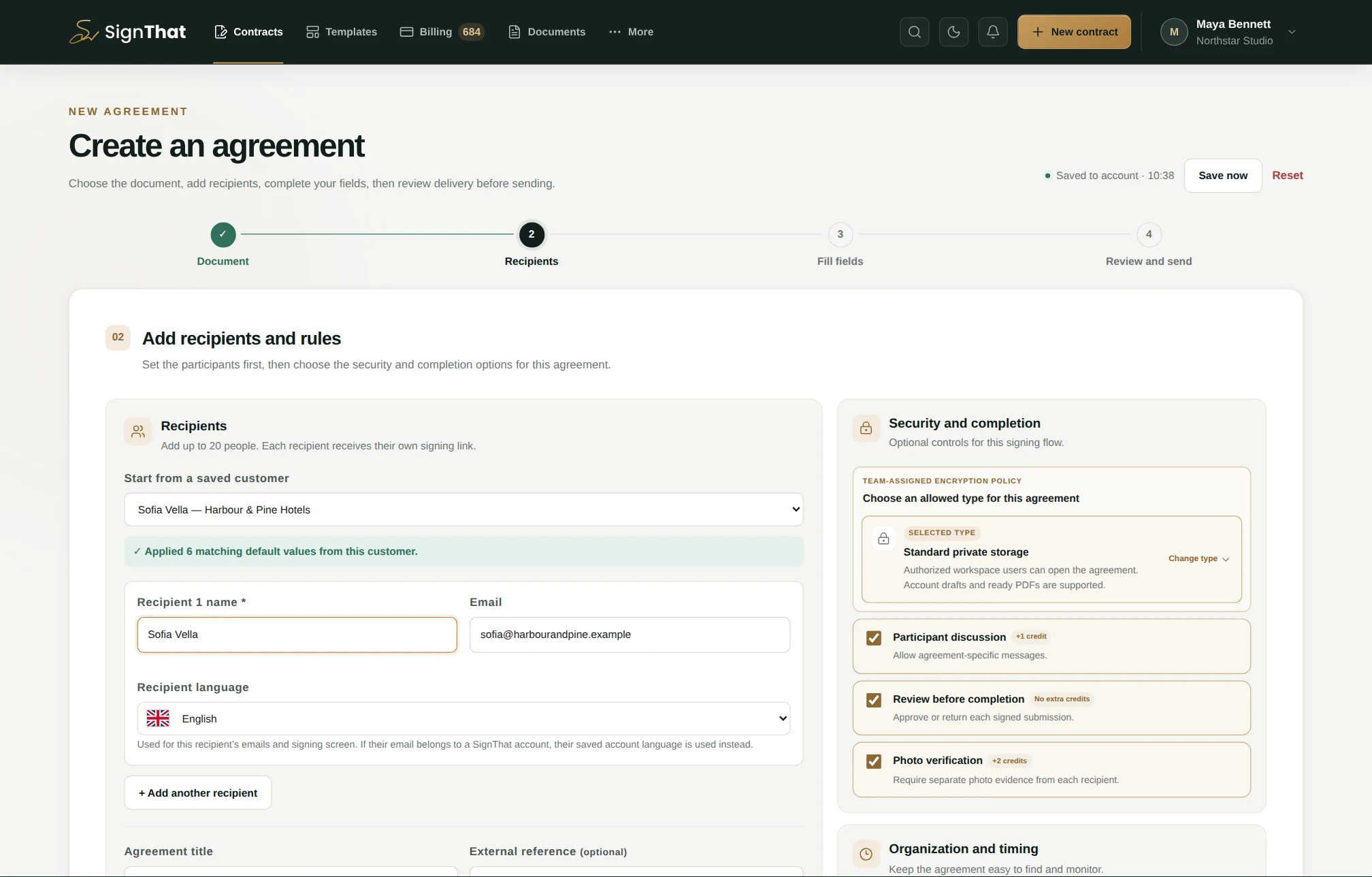
Sofia Vella, Harbour & Pine, the €6,800 project fee and the agreement controls form one fictional but internally consistent example.
Start from an approved template, write editable wording, convert a Word or PDF document, or upload a finished PDF that only needs signatures.
Select a saved customer or enter up to 20 recipients, then set encryption, review, discussion, evidence, tags, folders and validity.
Fill the sender-owned values beside a live document preview. Recipient-owned fields remain clearly identified for each signer.
Confirm the final preview, credit breakdown and email note, then send now, schedule a time or create secure links without emailing.
Use familiar Markdown for headings, emphasis and lists. Wrap a changing value in double curly braces, and SignThat detects it as a field you can label, pre-fill and assign to your team or a recipient.
# Brand identity project agreement

This agreement is between **Northstar Studio Ltd**
and **{{client_name}}**.

## Schedule and fee

Work begins on **{{start_date}}**.
The fixed project fee is **{{project_fee}}**.

Client representative: **{{client_representative}}**This agreement is between Northstar Studio Ltd and Harbour & Pine Hotels.
Work begins on 3 August 2026. The fixed project fee is €6,800 + VAT.
Client representativeRecipient completes this field
{{client_name}} becomes a field as you type, while repeated uses remain linked to the same value.
Give it a clear label and choose short text, long text, date or dropdown. Mark it required when the workflow needs an answer.
Choose “filled by you” for preparation details or “filled by recipient” when the signer should supply the value.
Save sensible defaults, preview the result and start each new agreement from the same approved wording.
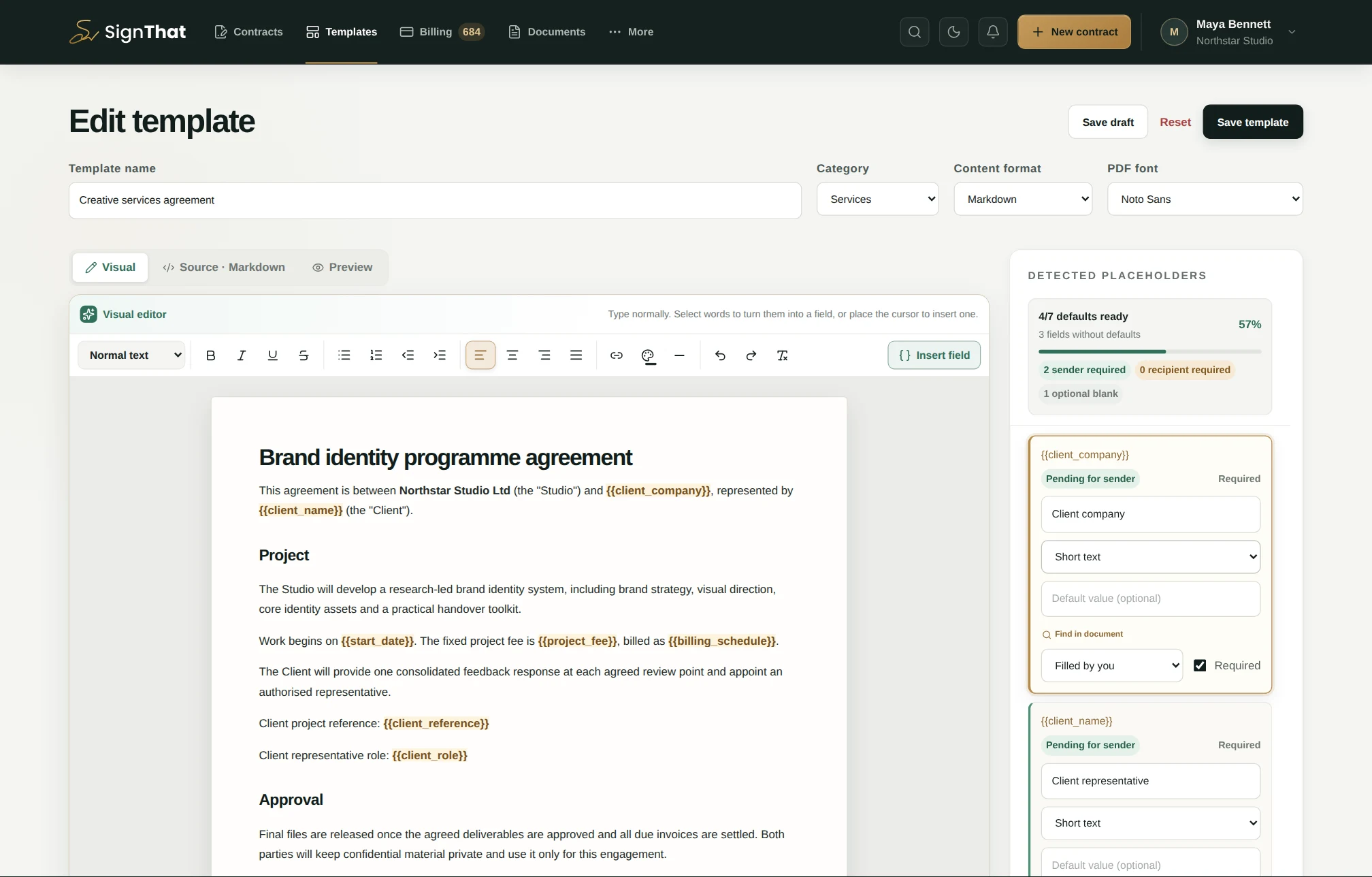
The fictional project example shows defaults for the client, date and fee, with one required field left for the recipient.
A standard recipient opens their unique link, reviews the agreement, completes only their assigned fields and signs—normally without creating a SignThat account. Optional end-to-end encrypted agreements use verified recipient accounts so the browser can obtain the correct decryption key.
Understand storage and encryption →The final PDF, recipient events and timestamps stay connected instead of being scattered across inboxes. Standard public signing links remain available for a limited grace period after completion and then expire; matching verified account holders can continue to access their agreement.
Read common signing questions →Open a workspace without a card and turn approved wording into a reusable signing flow.